




While the Pokemon franchise has continually introduced new mechanics over the years, there are some that have always been present over the years. One of those is how to heal in each of the mainline Pokemon games, which either consisted of using items or visiting a Pokemon Center. That remained the case in last year’s Pokemon Sword and Shield, but Game Freak has changed things up a bit with the new Isle of Armor expansion and this guide will tell you where you need to go to heal your Pokemon.
How To Heal
Pokemon Sword and Shield’s Isle of Armor takes the idea of the Wild Area and expands upon it by being open entirely compared to being only part of the game like in the main game. As a result, there aren’t any real towns for you to visit and as a result, no Pokemon Centers for you to visit either.
As long as you already have items in your inventory, you can always use them to heal as always. However, we are going to want a more thorough method for healing that patches up your entire party without having to use up your items.
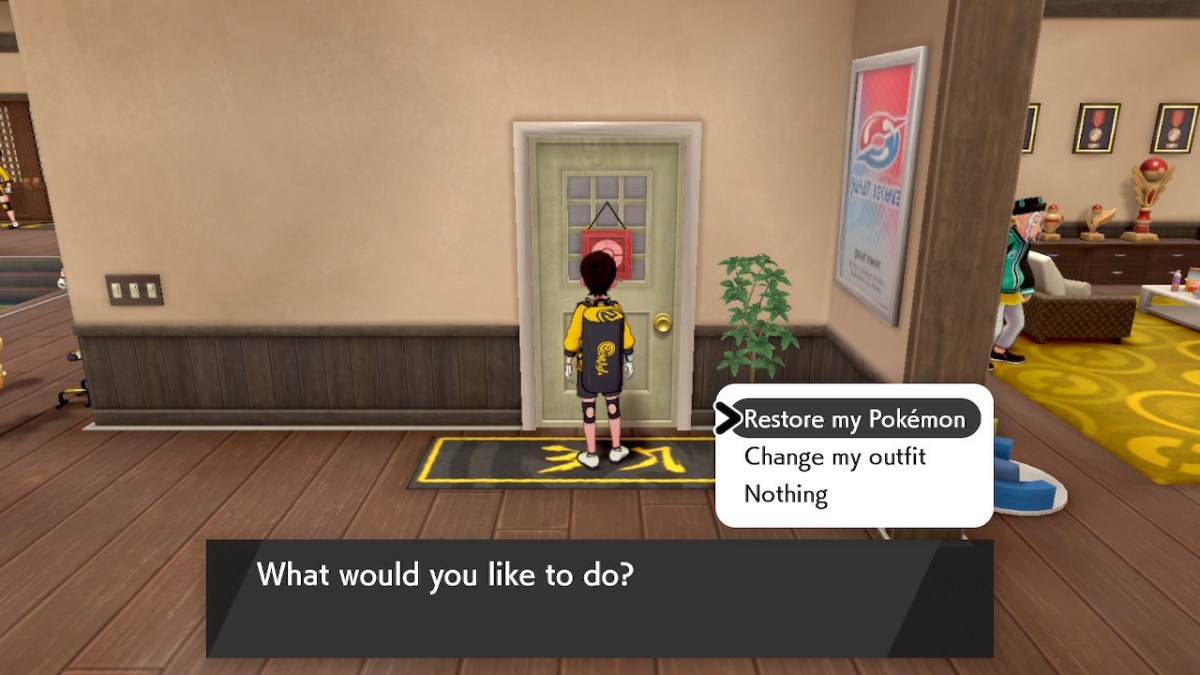
To heal in the Isle of Armor, you’re going to want to head to the Dojo. After you are given your Dojo Outfit, you will be given access to a room on the right to be able to change your clothes when you want.
This room has a dual purpose though, as interacting with it will give you two options, “Restore my Pokemon” and “Change my outfit.” Clearly you are going to want to select “Restore My Pokemon,” which it will do right away. After a quick chime like at the Pokemon Center, you will walk right back out the door with a fully healed party that is ready to go and catch even more Pokemon.







Published: Jun 25, 2020 03:52 am