



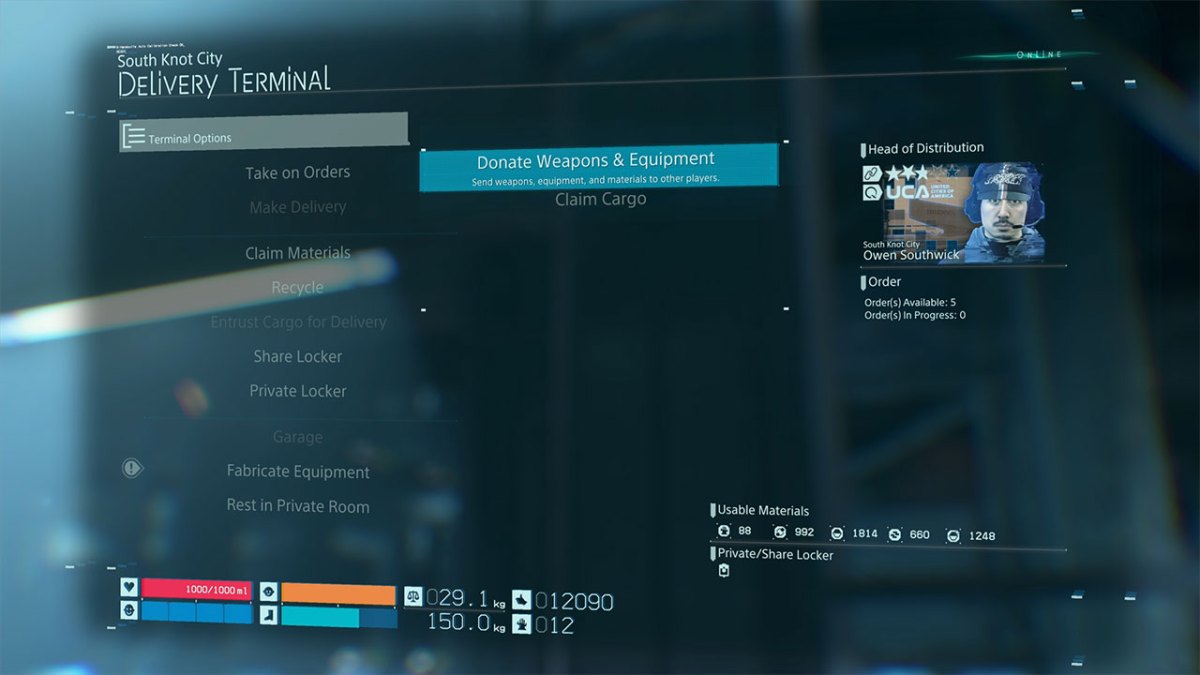

Donating Cargo to other players is one of the fastest ways to get likes because it helps other players directly. Any items that you have in your inventory can be added to a Share Locker at any terminal and can then be accessed by the Death Stranding community. To donate cargo you will simply look for the Share Locker option in a terminal or postbox menu.
Donate weapons and equipment to others to help them on their way
At the delivery terminal simply open the share locker and then choose to donate weapons & equipment. If you offer items to the share locker, it’s likely that the player who uses the items will give you likes. As well as giving players other items you can also take items from the Share Locker.
Any items that you ‘ve lost or entrusted to others can also be reclaimed at a Share Locker.
You will want to make sure that you don’t need the items that you’re placing in a Share Locker though. Once you put something into the locker you will not be able to reclaim it.



Published: Nov 7, 2019 06:31 am