



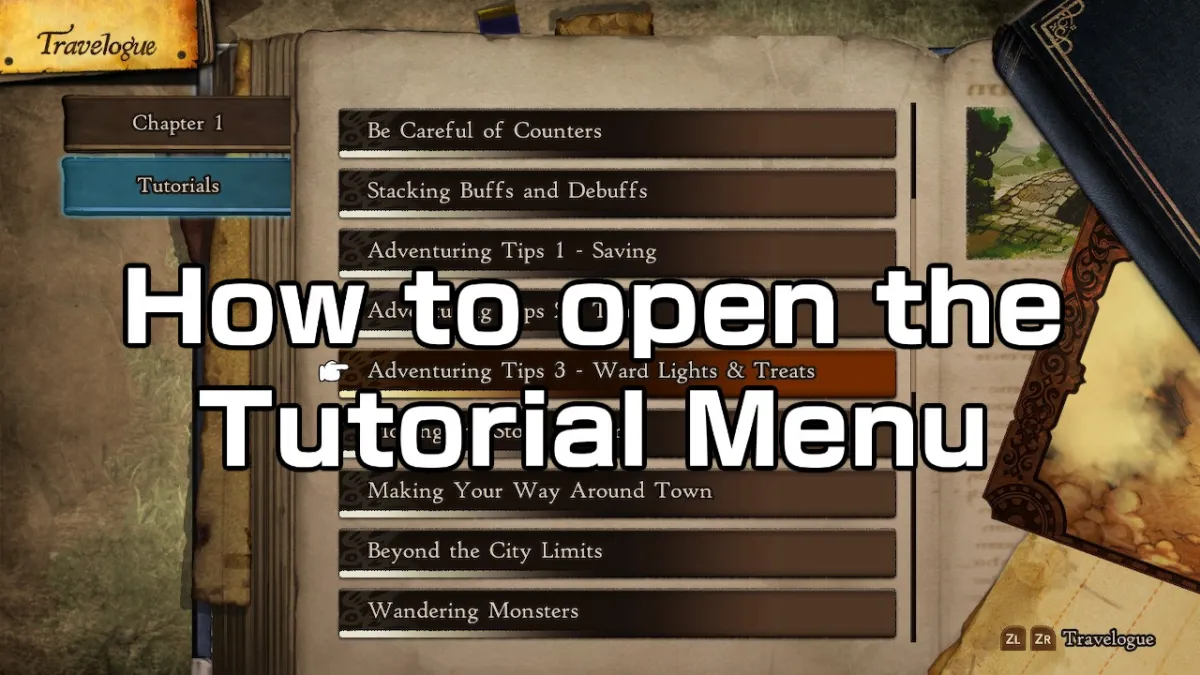

Bravely Default 2 does a great job of explaining to the player most of its core features, in a compact and simple way. There is a ton of things you need to research on for creating a strong party, in addition to lots of other stuff that focus around the world itself, or even your in-game options. In any case, there is a lot of reading you need to do, in order to understand some topics and the Tutorial Menu is here exactly for these reasons.
The Tutorial Menu is available for everyone, at any given time.
It is extremely often we either skip tutorials in video games, or simply miss them. We think that the game will hand-hold us when the time is needed for such an occasion, or it will be simple enough to understand on our own. This is usually the case, with certain exceptions of course, but what if we need to revisit some of the lessons the game provided in order to see if we skipped any details we may find useful. Or what if you just want to read a Job’s overview, to see if there is anything you are missing out.
If all of the above or any at all is your reason for wanting such a thing, then the handy Tutorial Menu is the option for you. It contains almost every info you need in order to progress through the game, any important aspects you need a refresher on, and loads of other things. In order to find it, you need to first open your Travelogue from the game’s menu. Click ‘X’, and it should be the first option you can see. Press it, and the world map will appear, alongside other handy details like your quest at that time. From there, just press ZR or ZL and your ‘Memories’ tab will appear. Scroll down, and you’ll see a window saying ‘Tutorials’. There you have it, all the tutorials you have unlocked up to that point, will be available for you to see right away.
Bravely Default 2 is set to release on February 26, exclusively for the Nintendo Switch.

Published: Feb 24, 2021 04:19 am