



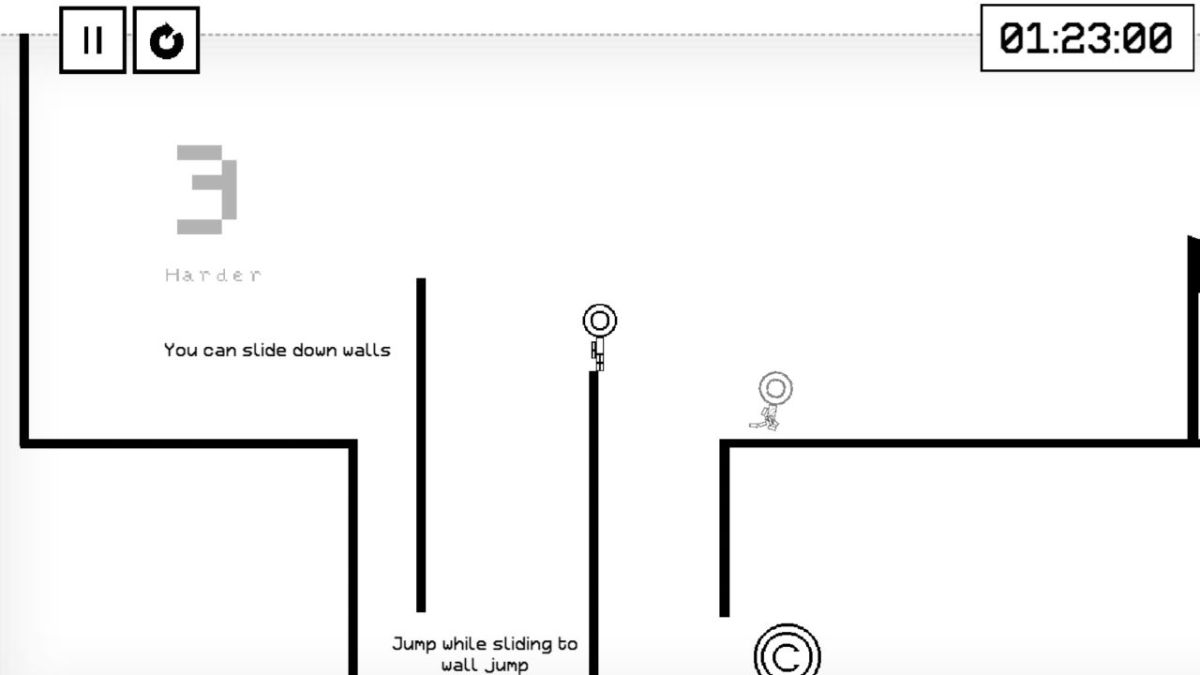
I have spent more hours than I care to admit staring at a stick figure and a bunch of black lines. If you are struggling to clear the Gauntlet or just can’t seem to find that one last coin, I have got you covered. I have personally tested every skip and glitch in this guide on the current v1.4.6 patch, which fixed that annoying race buffer bug that used to mess up my best replays. This isn’t just another basic walkthrough; I am going to share the actual physics math and speedrun secrets that I use to keep my times under the 12 minute mark.
The Secret Math Behind My Jumps
When I first jumped into OvO, I thought it was all about timing. But once I started digging into the engine, I realized it is a full-blown physics simulation. I found that my character follows a specific kinematic model that you can actually predict. My vertical position y at any given frame t is governed by this formula:
y(t) = v_y*t – (1/2)gt^2
In the current version of the game, I have measured the gravity constant g at approximately 0.3 pixels per frame squared. If I want to clear a massive spike pit that is H pixels high, I know my initial velocity v_y has to be:
v_y = sqrt(2gH)
I have noticed that my monitor’s refresh rate actually changes how these numbers feel. On my 165Hz gaming monitor, the game is calculating these trajectories much faster than on a standard 60Hz screen. If you are on a high-refresh monitor like me, you need to initiate your slides slightly earlier. For the infamous Level 30 floor clip, I wait until my purple trail crosses the third spike on the wall before I hit the down arrow. If you are on 60Hz, you should wait until the second spike.
Unlocking Everything with the Hourglass Cheat
If you are like me and just want to jump straight to the community levels or try out a new skin without the grind, I found a legendary UI exploit.
- First, I go to the main menu and click on the Credits button.
- I look for the spinning hourglass icon on the credits screen.
- I click that hourglass as fast as I can, usually about 15 to 20 times.
- Once it works, a pop-up says Like Magic! and every level and skin is unlocked.
This is much faster than the usual progression, though it won’t give you the satisfaction of earning the mythic skins the hard way.
How I Beat the Basics and Chapter 1
The first eight levels are my warm-up. I treat my character like a projectile rather than a person.
- Level 1: I just hold right and jump. It is the literal baseline.
- Level 2: I learned to stand right against the wall before jumping to get a vertical boost. I also use the smash move by pressing down in mid-air to break through the red hatched lines.
- Level 3: This is where I practice wall jumping. I slide down the first wall and tap the opposite direction to start my climb.
- Level 4: I run and press down to slide under the low ceiling. I always jump right before the slide ends to preserve my horizontal momentum.
Strategies for Getting Serious and Higher Order
Level 9 was my first real wall. I noticed that if I just walked toward the flag, the game would drop a wall in my face.
- Level 9: I head right and use a sequence of jump, dive, and jump again. If you time it right, you can smash through the lines at the very end to hit the flag before the wall closes.
- Level 10: I love using the 10 Clip here. By jumping into the ceiling at x:450, y:120 using an upward wall jump (UWJ), I can phase right through the top of the map.
- Level 16: I found a massive shortcut. I jump off the right side of the starting platform and use my mid-air air-move to curve around and land directly on the flag.
- Level 20: I go left and slide-jump over the first set of spikes. There is a diagonal spring in the center that I use to launch myself through the hatched lines. I always dive at the absolute peak of that jump to get the reach I need.
- Level 23: I follow the sign that says Believe and Dive. I just walk off the edge and dive into the pit. The flag is hidden at the bottom.
Mastering Mechanics and the Z Pattern Strategy
Chapter 4 introduces switches, and I found that my progress on these doors stays even if I die.
- Level 26: I use suicide runs here. I hit one switch, die, and then go for the next one. It is much faster than trying to survive the whole sequence.
- Level 30: This is the hardest level for most of my friends. I use the 30 Skip by sliding exactly when the moving platform hits the wall. This forces my hitbox through the floor.
- Level 31: This map moves as you hit switches. I found that following a Z pattern across the switches (Top-Left to Bottom-Right to Mid-Left) is the most efficient path.
Navigating the OvO Space Program and Portals
Rockets changed everything for me. I had to stop seeing them as obstacles and start using them as tools.
- Level 33: I fire the rocket and run back. I have noticed that the explosion hitbox can actually push me through red hatched lines if I jump at the exact frame of the blast.
- Level 40: For the final exit, I just slide-jump-dive off the very first ledge. I skip the entire rocket section this way.
Portals are all about preserving your velocity. Entering a portal in a smash state means I come out the other side with that same downward force, which I use to break through lines instantly.
The Economy of Skins and Collecting Every Coin
I have tracked exactly where every coin is, and there are 27 of them scattered across levels 3, 6, 10, and so on. Collecting these is the only way to afford the high-tier shop items.
- Alien Skin: This is my most expensive purchase at 70 coins. It has been around since v1.0 and is a total status symbol.
- ShyGuy Skin: I only had to spend 5 coins on this one. It was added in v1.4.4 to honor a famous speedrunner.
- The Fallen Skin: This is my favorite. You can’t buy it. I had to earn the Top Charts achievement by beating the entire game in under 12 minutes.
- Batter Skin: I unlocked this by getting the Purified achievement. Fun fact: this character is from the game OFF, and it is the only skin I have found where the visual model is actually shorter than the 8.8 fixed-point hitbox the game uses.
Patch Notes and the Current Meta
I am currently playing on version 1.4.6, which brought some great quality-of-life changes.
- The developers finally fixed the race buffer and replay desync issues.
- They added a Random Level button and better UI for the community levels.
- If you press F2 on your keyboard in the pause menu, you can toggle the debug mode and see your hitboxes. This is how I perfected my sub-pixel wall jumps.
If you follow my lead and use these physics models, you will find that the Gauntlet isn’t nearly as scary as it looks. It just takes a little bit of math and a lot of muscle memory.



Published: Apr 23, 2026 02:50 pm