




From tuning weapons, unlocking camos, and even equipping Calling Cards, Modern Warfare 2 has brought a variety of customizations that have left players enjoying the game even more. One of the customization features that may not be as well-known as others is that players can also change the color of their name. You may have even spotted players with colorful names in your lobbies yourself! If you’re wondering how to do so, here’s how to change your name to a different color in Modern Warfare 2.
How to Change Your Name Color in Modern Warfare 2
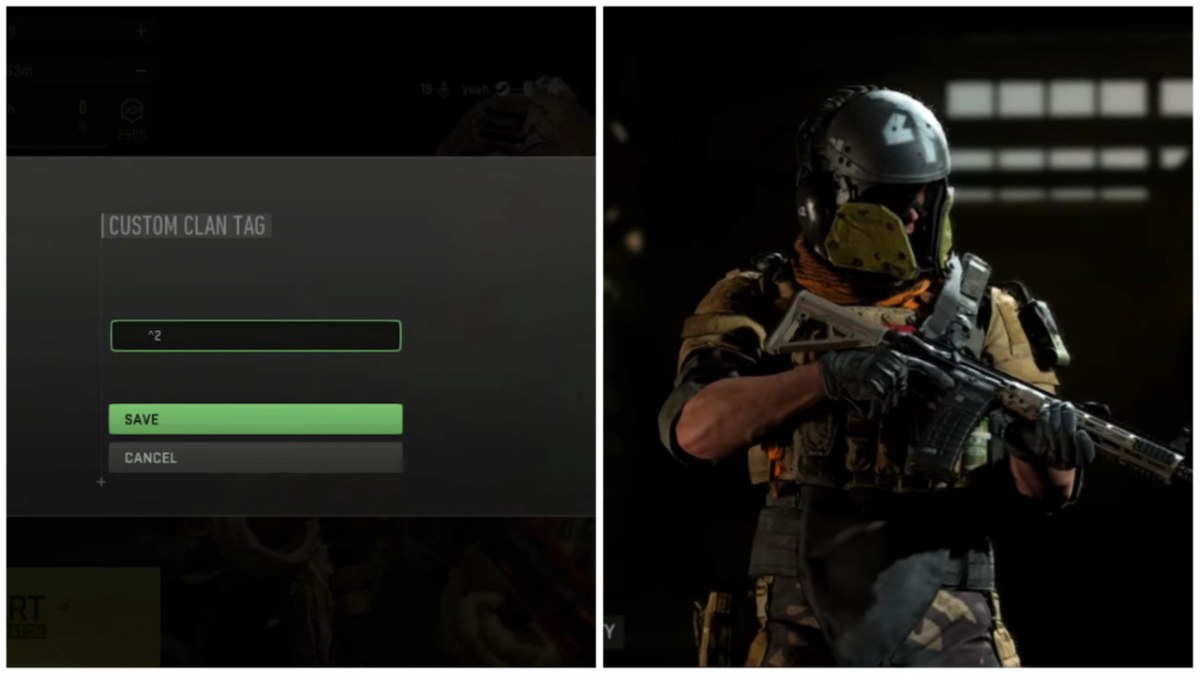
To change your name to a different color in Modern Warfare 2, you will need to enter color codes in your Clan Tag. Whether you want to stand out from others or prefer to use your favorite color, this is a great hidden built-in feature to utilize. Below are the steps to do so:
- Firstly, load up Modern Warfare 2 and head to the Player Account level section in the Main Menu. You can find it next to the gear-shaped Settings icon in the top-right corner of your screen.
- In that section, hit the Edit Clan tag menu.
- To add color to your name, type an upward arrow button key (^) and enter any number starting from 0 to 9, with each digit denoting a different color.
- So, for example, if you’d like to change your name color to green, type ^2 since that’s the number associated with green in the color code (see the complete list below). You can also add a colored Clan Tag by adding your preferred clan name after the color code.
- Lastly, hit the save button and exit. Your name should change to a different color by now.
Below is the complete list of all the color codes in Modern Warfare 2.
- ^0: Black
- ^1: Red
- ^2: Green
- ^3: Yellow
- ^4: Blue
- ^5: Light Blue
- ^6: Pink
- ^7: White
- ^8: Dark Blue
- ^9: Dark Red
- Fullstop (.): Light Green
- Apostrophe (‘): Grey
- Asterisk (*): Purple
- Percentage sign (%): Mint Green
- Plus sign (+): Orange
- Minus sign (-): Faded or Sky Blue
- Semicolon (;): Navy Blue
Call of Duty: Modern Warfare II is available right now for PlayStation 5, PlayStation 4, Xbox Series X|S, Xbox One, and PC.







Published: Nov 3, 2022 06:15 am