





If you were excited to jump into Tower of Fantasy, there’s a good chance that you may not have fully thought through your name before you got into the world. Now that you have decided that you don’t want to crawl through this sprawling land with the name that you’ve chosen, you may be wondering if there is any way that you can change it.
Let’s dive in and see if there is a way to change your name, and how you can go about doing that in this new live-service hit, so you’ll be able to roam these lands feeling the best that you possibly can. In Tower Of Fantasy, the sky is the limit, so let’s find out how to make this your own personal playground.
Can You Change Your Name in Tower Of Fantasy?
If you’re hoping that you can change your name in this new title, you’ll be able to do so easily, but there are a few steps that you’ll need to take before you’re able to do just that. You’ll need to stock up on some Dark Crystals, which you can earn by taking advantage of different quests, earning achievements, and by purchasing the Premium Pass, which will allow you to earn even more levels faster than ever.
But, if you’re looking to change your name, you’ll need to take a few steps to make it happen, and it can be confusing to players if they don’t know where to go. Let’s dive right into that, as well!
How To Change Your Name Easily
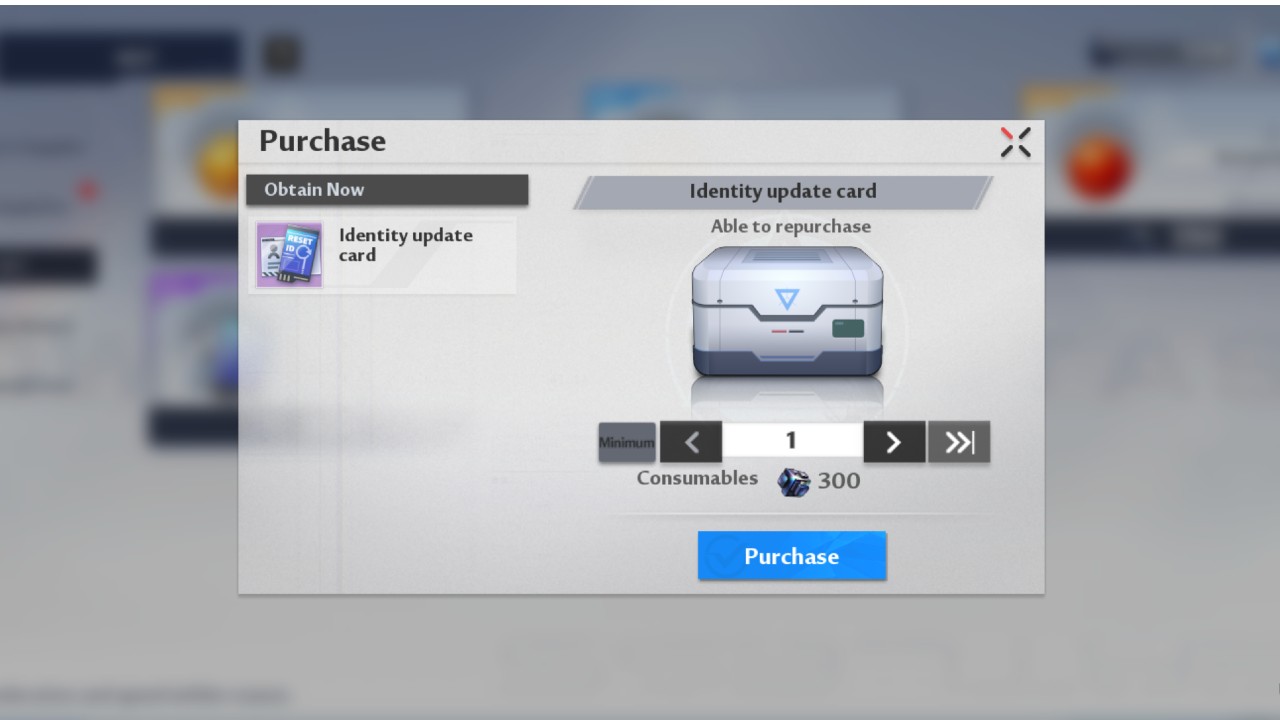
If you’re looking to change your name quickly and easily, you’ll want to head over to the Shop once you have unlocked it after a bit of playtime, and make your way into the HOT section of the store. With the low price of 300 Dark Crystals, you’ll be able to change your name to whatever you would like it to be, and as often as you would like. If you’re planning on rerolling in Tower of Fantasy, make sure that you’ve kept your favorite name for last.
And that’s all you’ll need to do to make this change! If you’re loving everything else about this game, make sure that you’re checking out our Tower of Fantasy Guide Section, where you can find out more information about the microtransactions in the game, how you’ll be able to break through rock walls, and if the game is coming to your favorite portable or home consoles shortly!
Tower of Fantasy is available now on mobile devices and PC.








Published: Aug 11, 2022 07:37 pm